Which notice, to which candidate, on what date, and what the provider said back.
AI hiring notice tracking software
Prove which candidate notice was sent, when it was sent, and what happened next.
Send the AI hiring notices Illinois, New York City and California require. See what landed and what bounced. Export the whole record the day a client or regulator asks. It runs alongside your ATS, not instead of it.
Approved wording, versioned
Your counsel’s language, pinned to a version number before a single notice goes out.
Delivery you can check
See which notices landed, which bounced, and which the provider never accepted.
Proof on demand
Pull a PDF or CSV for one candidate or a whole month, without a reconstruction project.
Approved template
Candidate notice ready
Version 4.2 - Staffing workflow
Delivery event
Delivery event recorded
Timestamped status response
Evidence export
PDF and CSV ready
Ready to send to a client or your counsel
Notice queue
Approved version
Delivery sync
Event recorded
Export status
Export when needed
Many recruiters, many client accounts, several states. One way of sending the notice.
Candidate notices and the records behind them. Your ATS keeps everything else.
Explore Notice Tracking
Choose the path that fits where your team is now.
See how the workflow runs, where staffing teams usually lose the proof, and which next step fits you.
Solutions
How healthcare, industrial, logistics and call center teams run candidate notices at volume.
Platform
A walk through the product: approved templates, routing, delivery events and exports.
Resources
The readiness checklist, the product tour, and articles on running notices at volume.
Product evidence
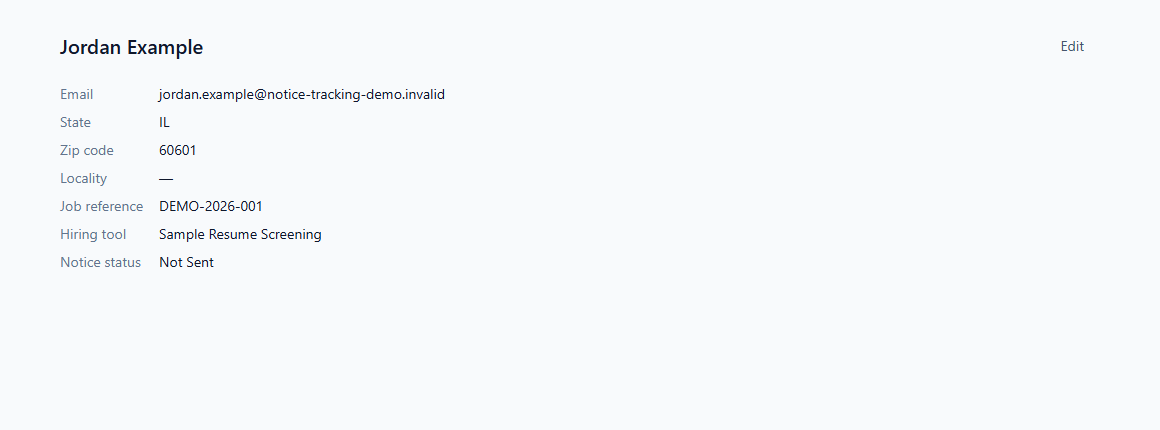
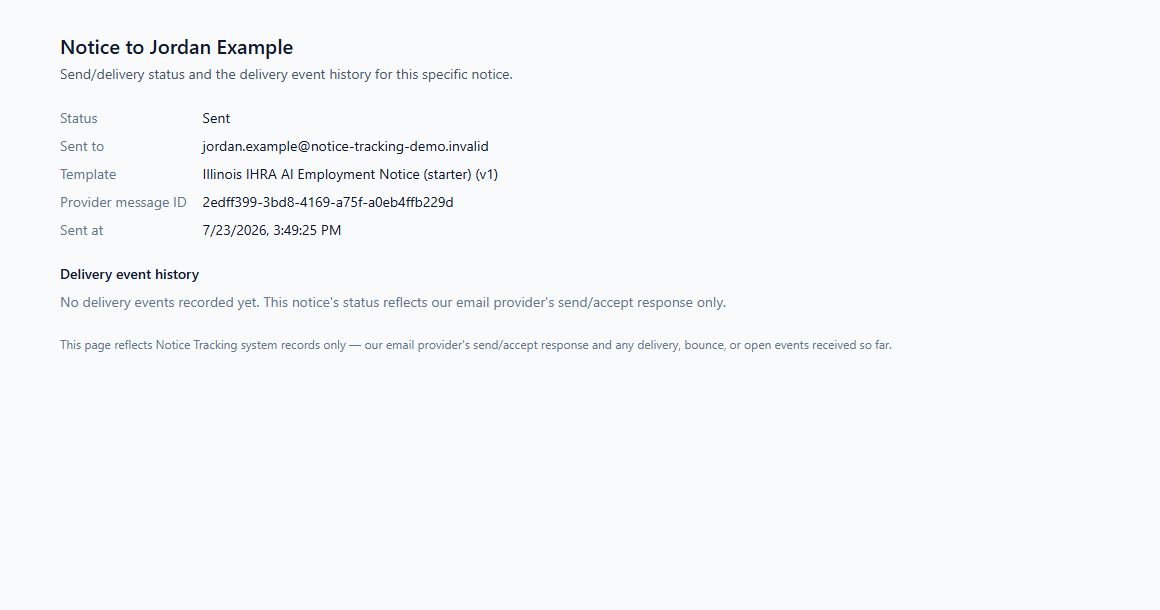
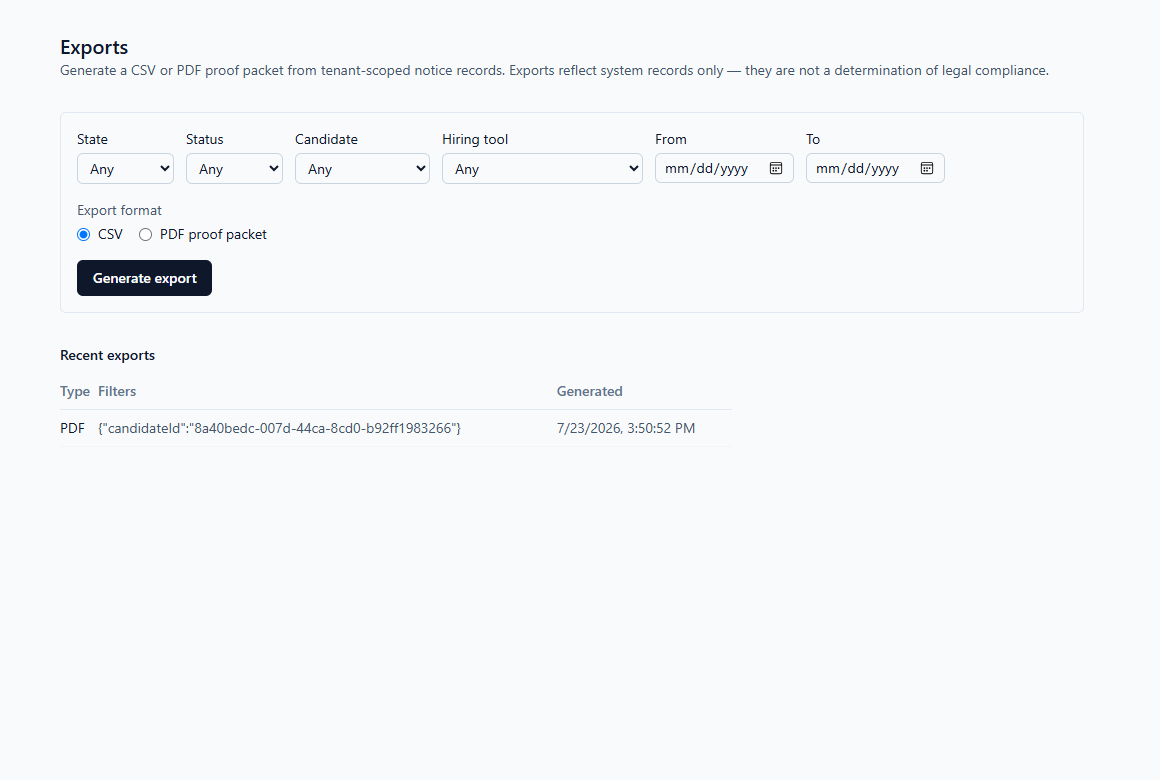
See the record at each step of the workflow.
Real screens from the application, with fictional sample data. “Sent” means the provider accepted the message. Whether it then arrived is a separate event, recorded separately.
The proof gap
Build the record now, not the week someone asks for it.
Sending the notice is the easy part. Six months later three recruiters have touched the candidate, the template has been edited twice, and nobody can say which wording actually went out or whether it arrived.
Notice Tracking keeps all of it in one record: the template version, the candidate, the send time, who triggered it, what the provider reported back, and every export you have run. Your ATS does not change.
How it works
From approved wording to an export you can hand over.
Five steps, run the same way by every recruiter, every time.
Map notice triggers
List which hiring tools touch which candidates, and where a notice belongs in that flow.
Load routing data
Import only what the notice needs: a name, an email, the role, the jurisdiction.
Send approved templates
Send from your counsel-approved wording. The version used gets pinned to the candidate.
Watch what happens next
Send attempts, provider responses, bounces and who did what, all on one timeline.
Export the record
Pull a PDF or CSV when a client, your counsel or an agency asks for one.
What working with us looks like
Add candidate notice tracking without touching the rest of your hiring stack.
You own the wording. We send it, track it, keep it, and get it back out again, right next to the tools your recruiters already work in.
Getting started
Add the hiring tools you already use, point your candidate flow at them, and pick the approved template each workflow should send.
What we need from you
A name, an email, the role, and which tools touch which stage. Resumes, assessment scores and scoring logic stay where they are. We never ask for them.
Where your ATS fits
Exactly where it is now. Notice Tracking takes the notice, the delivery record and the export, and leaves the rest of your stack alone.
What evaluation looks like
A short call to map your tools and states, a test send you run yourself, and a straight recommendation on which plan fits your volume.
Who does what
Notice Tracking handles the notice. Here is who handles the rest.
- Your approved notice templates, and every earlier version
- Sending the notice, and what the provider reports back
- A timestamped history that cannot be edited after the fact
- PDF and CSV exports, whenever you need one
- Your counsel: what the law requires, and how the notice reads
- Your counsel: which of your roles each rule reaches
- Your bias auditor: any audit of the hiring tool itself
- Your hiring team: every decision about who moves forward
Pricing
You pay for notices, not for seats.
Every plan gets unlimited users and the same workflow: approved templates, delivery tracking and exports. The higher tiers carry more notices a month and more room for client-by-client variation.
Whichever tier you land on, this should run in the background. Nobody should have to remember to send a notice, and nobody should have to rebuild the record afterwards.
Starter
For a smaller team, or a first run of notices you want to get right.
Annual plan, paid monthly
$199/mo
- Single workspace
- Approved notice templates
- Delivery event matching
- Standard retention
- Email support
Growth
For a steady weekly pipeline across a handful of client accounts.
Annual plan, paid monthly
$499/mo
- Multiple templates
- Candidate import
- Evidence exports
- Expanded workflow organization
Operations
For agencies running several client accounts, or candidates in more than one state.
Annual plan, paid monthly
$899/mo
- Role-based review workflow
- Operational reporting
- Expanded evidence exports
- Workflow mapping support
Scale
For high-volume agencies that get asked for records often enough to need them ready.
Annual plan, paid monthly
$1,399/mo
- High-volume notice operations
- Custom evidence requirements
- Volume pricing discussion
- Broader implementation support
Standard overage pricing is $25 per additional 25 notices across all plans. Every plan includes unlimited users at no additional cost. Sending more than 10,000 a month? Talk to us about volume pricing.
Readiness checklist
See where your current notice process breaks down.
Six questions about template approval, candidate routing, delivery tracking, version history, exports and retention. Answer them and you will know which one is your weak spot.
Review Your Notice WorkflowChecklist review areas
- Automated hiring tool inventory
- Approved notice template ownership
- Candidate routing and timing
- Delivery status recordkeeping
- Retention and export process
FAQ
Common questions about AI hiring notice software.
Why not just build this ourselves?
Sending the email is a weekend of work. Keeping it running is the job. Somebody has to catch it when a state changes its rules, get new wording past your counsel, keep the old versions so you can still answer for what went out last March, chase the bounces, and find one candidate's record two years later while a client waits on the phone.
A spreadsheet and a shared inbox will get you through one client review. They will not get you through four states, thirty client accounts and a four-year retention window. Teams that build this themselves usually find the sending was the cheap part.
Does Notice Tracking tell us what the law requires?
No. Your counsel decides that and approves the wording. Notice Tracking holds the approved version, sends it, and records what happened to it.
Does Notice Tracking replace our ATS?
No. It runs beside your ATS. Candidates, requisitions and placements stay where they are; notices, delivery records and exports come here.
Does Notice Tracking screen or score candidates?
No. It never ranks, scores or rejects anybody. It sends the notice and records what happened to it.
Which states require an AI hiring notice?
Illinois, New York City and California all have requirements in force today, and Colorado and Connecticut have dates set for 2027. Each names a different trigger and a different record to keep. The AI hiring laws by state pages set out who enforces each one and link to the agency's own page. Which of them reaches your roles is a question for your counsel.
How do we prove a candidate notice was delivered?
The email provider tells you, and Notice Tracking keeps what it said. Every notice carries its send timestamp, the provider's response, and any later delivery, bounce, failure or suppression event — attached to the candidate and to the template version that produced it. That is what comes out in the export.
Do you supply an AI hiring notice template?
We store yours. The wording comes from your counsel; Notice Tracking versions it, sends it, and keeps every earlier version so you can still show what a candidate received two years ago.
From the Blog
How other staffing teams run their notice workflow.
Practical write-ups for the people who actually send the notices.
What Is Notice Tracking? A Practical System for AI Hiring Notice Records
See how Notice Tracking organizes approved templates, delivery events, record retention, and exportable evidence without replacing the ATS.
Read articleThe AI Hiring Notice Problem: Why Sending the Notice Is Not Enough
Learn why notice delivery, recruiter handoffs, and fragmented recordkeeping create proof gaps even when a message was sent.
Read articleAI Hiring Readiness Checklist for Staffing Agencies
Use this checklist to review automated hiring tools, approved templates, delivery events, and evidence export readiness.
Read articleNext step
Pick the right starting point.
Talk through your workflow, run the checklist yourself, or just ask us a question.
See pricing
Tell us your hiring tools, your states and your monthly volume, and we will point you at the right plan.
Review Your Notice Workflow
Six questions on your current notice process, and where it is likely to break.
Contact Us
For anything else: readiness questions, partnerships, or company inquiries.